

Working with the team at Key Medical Associates, I collaborated with a graphic designer through Figma to create the overall design, fonts, and colors, then added my own design take to produce the finished design. Responsive code tested to 3200px wide and down to 325px wide assures graceful collapse down to mobile. The Provider’s table is also responsive, employing several techniques to furnish a usable UI at even the smallest scale. Photography was provided by another resource and those photos shared securely and organized in my secure file sharing repository, making it easy to get the needed content to me and keeping track of what was submitted.
You can visit this website at https://keymedicalassociates.com
The site is a beginning and will include more content as time goes by. The content I provided gets them started, and I look forward to continuing to help them. All my builds are designed with the non-technical content manager in mind, and training is provided.
UX Of Interest
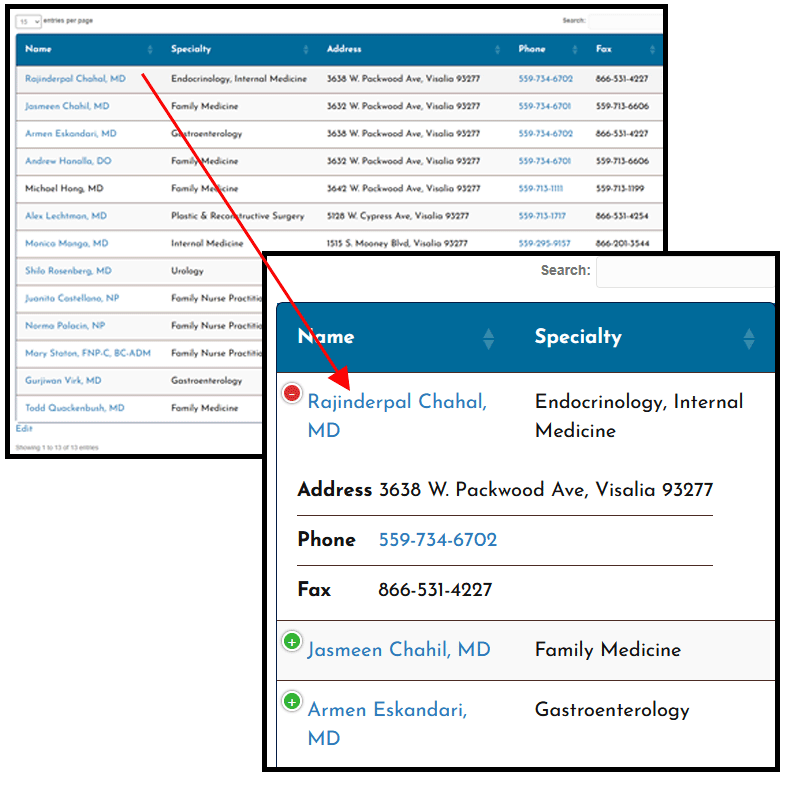
The Providers table has a mobile behavior capability that is really interesting. Once configured correctly, it allows the table to collapse elegantly all the way down to smaller screens while preserving access to a provider’s details as shown here. You can try it out at https://keymedicalassociates.com/providers/
Each provider has a bio page with an image of the person and text wrapping next to and around it. By default, WordPress treats it this way on mobile:

In the above picture we see the “Back to Providers List” button that makes it easier on mobile to return to that page without having to use the browser’s back button. But we also see that the text is being squeezed into the channel to the right of the image. It doesn’t look terrible, but it could look better. I solved this problem with some JavaScript that analyzes the space available to the right or left of an image, and modifies the layout accordingly:

Now we see the image is centered above text that has plenty of room to breath. The best part is the client can invoke this behavior within the page builder on any page where this sort of layout is in play without having to know anything about code.