
Web design is a multi-faceted discipline requiring expertise in UX design, graphic design, mobile web design, image optimization, writing, photography, and of course cyber security. With WordPress, web design also means creating pages in such a way that a non-technical client could update the content themselves, and so also includes writing user guides, documenting functionality, and providing remote training via screen sharing. And that's just for starters. As you can see, there are a lot of layers that have to fit together perfectly in order to launch a successful website.
Financials
The Discovery phase incurs my hourly rate and is billed upon completion. From Discovery we derive the final flat-fee cost. That cost is then distributed across phases.
We are essentially building a Request For Proposal (RFP) set of documents because you don't have such documents to give me up front. That's not unusual, and I'm ready to help. Each phase is usually iterative, meaning that rounds of approval are needed until the desired results are achieved.
- This phase verifies the rough cost estimate given during our conversations, or modifies it depending on what is discovered. You'll sign my General Consulting contract which covers the activities in this phase only. Once we move out of this phase, I'll create a Scope of Work, which will be our web design contract that you will then sign as well.
- Document all custom functional requirements, such as a secure research library, e-commerce tied to multiple accounts, HIPAA compliant web forms, and more. How does the data live, where is it stored, how long should it persist, what needs to be in the user guide, the developer documents, and what needs to be presented during training? These kinds of questions are important for software development, which is what custom functionality is.
- Define all content required on every page of the website. Writing, images, video, PDF files, and more need to be uploaded into my secure file sharing portal where it will be stored in folders named after each page on your website.
- If the needed content has yet to be created, we can identify how FlexTech Media can be engaged to create that content. Alternatively, you will let us know the date by which all such content will be turned in.
- If the needed content has yet to be created, and you wish to create it yourself, we will determine a date by which that will happen so the project can continue. Whether I create it, or you create it, we don't move out of the Discovery phase until all the website content is available, has been reviewed, and its future location identified within the website. The exception is content we know with a high degree of certainty will be available at some point before we reach the Design phase, and this should be the exception not the rule.
- Cyber security requirements are defined and any additional cost is captured. In the age of AI hacking websites, this has to be a primary consideration and it's important you understand exactly what will be done to secure your website and adapt it as new security threats emerge.
- Will SEO experts be involved in the initial content creation? If so, we'll need them to participate in the discovery meeting or we'll need to have a separate meeting just with them. SEO imposes its own requirements on a WordPress website that can radically alter the cost estimate and how it's built.
- Produce the site map (see the downloadable PDF example above).
- Derive the final cost estimate and invoice for the phase.
- You now have a set of documents comprising your Request For Proposal and the basis for our Scope of Work (contract).
Now you'll approve the Scope of Work for your web design project. This becomes our contract for the rest of the work.
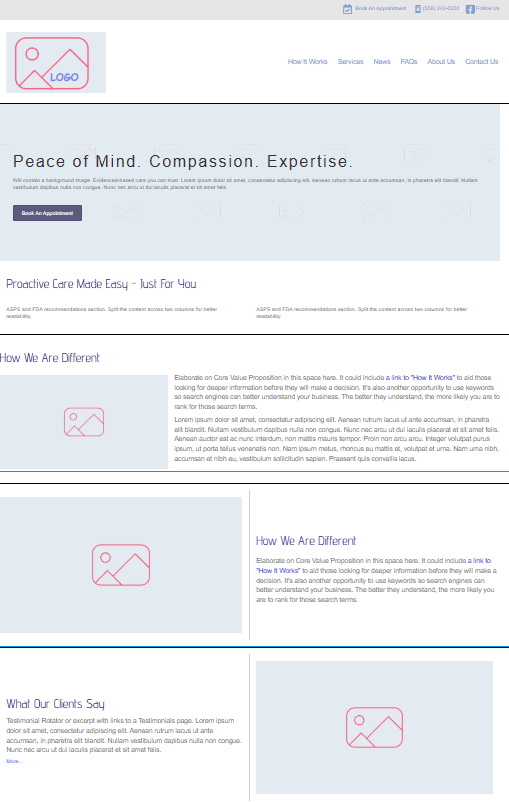
Wireframes are digital napkin sketches of content blocks on a page from top to bottom. Access to the actual content that will live on the website is best, but approximate content is fine if it is indeed a realistic substitute for the real thing and this is the exception not the rule. Sometimes a specific page's content is anticipated at a later date with a high degree of certainty, and so we can move out of Discovery and into Wireframing. That's the case with the screenshot below.
This phase generates no design, but instead focuses on layout and how the content will be placed top to bottom on a page. Because there is no design yet, we can move the content blocks around in the wireframe with relative ease.
This phase is also where user interface design (UX design) becomes important. The placement of UI elements involved in workflows such as user self-sign-up, placing an order, and other interactive requirements are positioned in the wireframe along with any navigation elements such as the main menu.
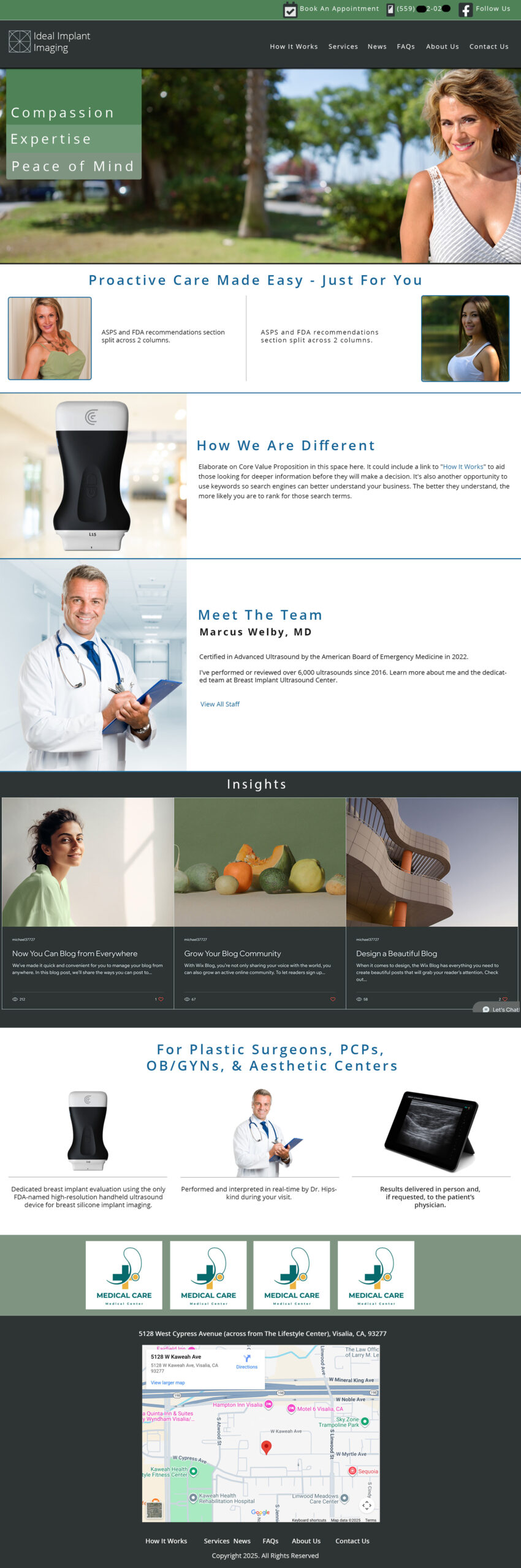
Now I create a static image that presents your website's home page and inside page designs using real content. In this phase, all the UX design patterns discovered in the Wireframe phase are implemented as design elements. Different button states, link states, and more are simulated in this phase. Compare the design comp below to its wireframe in the previous section.
The fonts used in the mockup are the same that will be used on the website, and so must be web fonts that are freely licensed and which can be converted to the .woff2 format. I say this in case you have a designer of your own (I often work with company designers) and we need to produce the comp together.
Some placeholder content is fine at this point, as long as it accurately reflects the nature of what will replace it by the time we get to coding.
In the coding phase the content for the website is used to inform how the code is formed for both desktop and mobile. Content is critical to this phase. This is where having only dummy content (such as Lorem Ipsum) can cause problems because at this point we are coding for actual content to take the website live. If I'm stuck with placeholder content, that means I have to go back through the website later and swap out the content with the real thing, and then make any code adjustments that this will likely require. Such a situation can double the cost of the phase and extends the completion date.
In this phase, we test together all the website's functionality, make adjustments, and test again. This iterative process is repeated until the design and all functional considerations are met. It also includes:
- Coding desktop, tablet, and mobile behavior.
- Fonts are localized. This means I convert the selected fonts from the design into web fonts served from your website, and not from an external third-party source.
- Backup technology is implemented and scheduled. This is usually a combination of server-side backups and backups created by a local plugin I select that stores it's data in a secure offsite location away from your website.
- Generating the XML sitemap.
- Implementing attack monitoring to catch and block probes seeking entry into your website.
- Obfuscating the login page.
- Implementing 2-Factor Authentication and other login security layers.
- Blocking directory browsing and other proactive countermeasures.
- Third-party integrations such as HubSpot, the PracticeQ ecosystem, WooCommerce testing with your financial provider, and more.
- Securing web forms with ReCaptcha and encrypting data at rest if needed.
- And much more security work required for a self-hosted WordPress site to remain safely above the hacking fray.
Now the remaining content is placed into the website, new pages are generated, the blog is filled out, web forms are tested (including HIPAA compliant forms), the UX is fully implemented, and any code adjustments are made.
In this phase, you will need to test the website on desktop, tablet, and mobile. It's important you have access to all three types of devices for accurate assessment of the coded website.
Once this phase is approved and closed, any changes beyond this point are billed as Change Requests.
Up until this point, we will have been working on a protected staging server inaccessible to search engines. During Go Live, we migrate the staging website to the live web host we agreed upon in the Discovery phase:
- DNS is updated and propagation takes place. This usually takes about 2 days to complete and is automated.
- All cyber security countermeasures are adjusted for the newly migrated website including but not limited to:
- Implementing a web application firewall, multi-layered site security, login security, and attack monitoring.
- Implementing redirection so that pages that no longer exist on your old site are mapped for the search engines to the new website. This preserves ranking and search fidelity.
- We confirm you can access the WordPress dashboard, including using the password recovery feature just to make sure it works.
- I implement Google Analytics or the analytics package identified during Discovery.
- Web form behavior is validated again, including confirming encryption is working.
- Redirection is implemented so that pages that no longer exist are mapped to pages that do on the live website.
- All workflows are re-validated. This includes posting research articles securely, purchasing a job package, and other custom features that create a user workflow.
- Training staff on how to update the various content held within different controls can happen before or after go live. That is another aspect we clarify in the Discovery phase.